
書式設定にアップデートがありました!!!
customRowAction に新たに setValue アクションが追加され、このアクションを利用することによって、アイテム更新ができるようになりました!!
You can now update the value of a field with a button created in the formatting😍😍✨
— てっちゃん (Tetsuya Kawahara) (@techan_k) 2021年11月18日
I can't stop being excited!!https://t.co/DOQcx7X3sJ#SharePoint #MicrosoftLists #ListFormatting pic.twitter.com/0RO0vDBcEj
設定方法については、次の Microsoft Docs を参照ください。
以下、作成してみた書式設定のサンプルを掲載します。
※作成次第、随時追加していきます。
- サンプルについての注意
- ニュースをページに降格(昇格した状態列の書式設定)
- クリスマスプレゼント(ギャラリービューの書式設定)
- アイコンボタン(はい/いいえ列の書式設定)
- リンククリック数とクリックしたユーザーの記録(ハイパーリンク列の書式設定)
- リアクション(複数ユーザー列の書式設定)
- タスク完了チェック (はい/いいえ列の書式設定)
- Count up , Count down(数値列の書式設定)
- トグルボタン (はい/いいえ列の書式設定)
サンプルについての注意
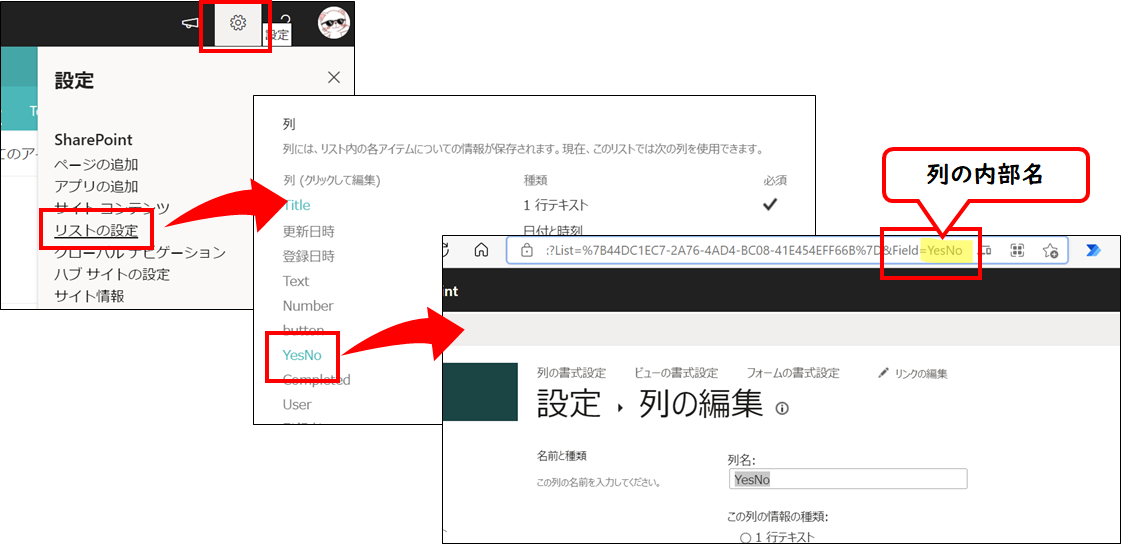
サンプルコード内に 列の内部名 が記載されている部分があります。

もしサンプルを利用する場合は、その部分を自身のリスト定義にあわせて変更ください。
ニュースをページに降格(昇格した状態列の書式設定)
I was able to update the Promoted State with setValue action as well🤩!!#SharePoint #MicrosoftLists #ListFormatting pic.twitter.com/W1g3dm4Pnb
— てっちゃん (Tetsuya Kawahara) (@techan_k) 2021年12月6日
{
  "$schema": "https://developer.microsoft.com/json-schemas/sp/column-formatting.schema.json",
  "elmType": "div",
  "style": {
    "flex-wrap": "wrap",
    "display": "flex",
    "flex-direction": "row"
  },
  "children": [
    {
      "elmType": "div",
      "txtContent": "=if(@currentField == 0 ,'0 : Page' , if(@currentField == 1, '1 : News (Unpublished)' , if(@currentField == 2 , '2 : News','') ) )",
      "style": {
        "box-sizing": "border-box",
        "padding": "4px 8px 5px 8px",
        "display": "flex",
        "border-radius": "16px",
        "height": "27px",
        "align-items": "center",
        "white-space": "nowrap",
        "overflow": "hidden",
        "margin": "4px 4px 4px 4px",
        "border": "1px solid"
      },
      "attributes": {
        "class": "=if(@currentField == 0 ,'ms-fontColor-themePrimary ms-borderColor-themePrimary ms-bgColor-white' , if(@currentField == 1, 'ms-fontColor-themePrimary ms-borderColor-themePrimary ms-bgColor-themeLighter' , if(@currentField == 2 , 'ms-fontColor-white ms-borderColor-themePrimary ms-bgColor-themePrimary','') ) )"
      }
    },
    {
      "elmType": "div",
      "style": {
        "margin-left": "10px",
        "font-size": "18px",
        "cursor": "pointer",
        "display": "=if(@currentField == 0 , 'none' ,'')"
      },
      "attributes": {
        "iconName": "PageEdit",
        "class": "ms-fontColor-themePrimary"
      },
      "customCardProps": {
        "openOnEvent": "hover",
        "directionalHint": "rightCenter",
        "isBeakVisible": true,
        "formatter": {
          "elmType": "div",
          "txtContent": "Change to 0:Page",
          "style": {
            "padding": "10px 20px 10px 20px",
            "cursor": "pointer"
          },
          "attributes": {
            "class": "ms-bgColor-themeLighter--hover"
          },
          "customRowAction": {
            "action": "setValue",
            "actionInput": {
              "PromotedState": "0"
            }
          }
        }
      }
    }
  ]
}
クリスマスプレゼント(ギャラリービューの書式設定)
I tried to modify the formatting of the Christmas presents I created before!!
— てっちゃん (Tetsuya Kawahara) (@techan_k) 2021年12月15日
🎁 Fixed to show numbers 1 to 25 like an advent calendar.
🎁 Fixed so that only presents up to today can be opened.#SharePoint #MicrosoftLists #ListFormatting https://t.co/yp6Th7EyN1 pic.twitter.com/0yQNzgn9w0
{
  "$schema": "https://developer.microsoft.com/json-schemas/sp/v2/tile-formatting.schema.json",
  "width": 280,
  "height": 280,
  "hideSelection": true,
  "formatter": {
    "elmType": "div",
    "style": {
      "display": "flex",
      "flex-direction": "column",
      "padding": "10px"
    },
    "children": [
      {
        "elmType": "div",
        "txtContent": "=getDate([$Date])",
        "style": {
          "width": "20%",
          "height": "20%",
          "border-radius": "50%",
          "display": "flex",
          "align-items": "center",
          "justify-content": "center",
          "font-size": "20px",
          "font-weight": "bold"
        },
        "attributes": {
          "class": "ms-bgColor-themeLighter"
        }
      },
      {
        "elmType": "div",
        "style": {
          "display": "=if([$Opened] , '' , 'none')",
          "width": "80%",
          "height": "80%"
        },
        "customRowAction": {
          "action": "setValue",
          "actionInput": {
            "Opened": "=if([$Opened] , '0' , '1')"
          }
        },
        "children": [
          {
            "elmType": "div",
            "style": {
              "display": "flex",
              "align-items": "center",
              "justify-content": "center",
              "height": "90%",
              "width": "100%"
            },
            "children": [
              {
                "elmType": "img",
                "style": {
                  "max-height": "90%",
                  "max-width": "90%"
                },
                "attributes": {
                  "src": "[$Present.serverRelativeUrl]"
                }
              }
            ]
          },
          {
            "elmType": "div",
            "txtContent": "[$Title]",
            "style": {
              "display": "flex",
              "align-items": "center",
              "justify-content": "center",
              "height": "10%",
              "font-size": "18px",
              "font-weight": "bold"
            }
          }
        ]
      },
      {
        "elmType": "div",
        "style": {
          "display": "=if([$Opened] , 'none' , 'flex')",
          "flex-direction": "column",
          "width": "80%",
          "height": "80%",
          "cursor": "pointer"
        },
        "customRowAction": {
          "action": "setValue",
          "actionInput": {
            "Opened": "=if([$Opened] || [$Date] >= @now , '0' , '1')"
          }
        },
        "children": [
          {
            "elmType": "div",
            "style": {
              "display": "flex",
              "justify-content": "center",
              "height": "20%",
              "position": "relative",
              "top": "5%"
            },
            "children": [
              {
                "elmType": "svg",
                "style": {
                  "fill": "[$RibbonColor]"
                },
                "attributes": {
                  "viewBox": "0 0 40 20"
                },
                "children": [
                  {
                    "elmType": "path",
                    "style": {
                      "stroke": "rgba(0,0,0,0.2)"
                    },
                    "attributes": {
                      "d": "M 20,20 L0,10 L0,0 L20,10 L40,0 L40,10 L20,20 Z"
                    }
                  }
                ]
              }
            ]
          },
          {
            "elmType": "div",
            "style": {
              "display": "flex",
              "flex-direction": "column",
              "align-items": "center",
              "justify-content": "center",
              "position": "relative",
              "width": "100%",
              "height": "80%"
            },
            "children": [
              {
                "elmType": "div",
                "style": {
                  "width": "100%",
                  "height": "20%",
                  "background-color": "[$BoxColor]",
                  "box-shadow": "0 0 5px rgba(0,0,0,0.6)",
                  "z-index": "2"
                }
              },
              {
                "elmType": "div",
                "style": {
                  "width": "90%",
                  "height": "80%",
                  "background-color": "[$BoxColor]",
                  "box-shadow": "0 0 3px rgba(0,0,0,0.6)",
                  "z-index": "1"
                }
              },
              {
                "elmType": "div",
                "style": {
                  "position": "absolute",
                  "width": "15%",
                  "height": "100%",
                  "background-color": "[$RibbonColor]",
                  "box-shadow": "0 0 3px rgba(0,0,0,0.6)",
                  "z-index": "3"
                }
              },
              {
                "elmType": "div",
                "style": {
                  "position": "absolute",
                  "width": "90%",
                  "height": "15%",
                  "background-color": "[$RibbonColor]",
                  "box-shadow": "0 0 3px rgba(0,0,0,0.6)",
                  "z-index": "4"
                }
              }
            ]
          }
        ]
      }
    ]
  }
}

アイコンボタン(はい/いいえ列の書式設定)
YesNo Column Formatting🎨 #SharePoint #MicrosoftLists #ListFormatting pic.twitter.com/6nII4ofnjz
— てっちゃん (Tetsuya Kawahara) (@techan_k) 2021年11月30日
{
  "$schema": "https://developer.microsoft.com/json-schemas/sp/v2/column-formatting.schema.json",
  "elmType": "div",
  "style": {
    "margin": "5px"
  },
  "children": [
    {
      "elmType": "div",
      "style": {
        "width": "40px",
        "height": "40px",
        "border-radius": "50%",
        "display": "flex",
        "justify-content": "center",
        "align-items": "center",
        "font-size": "20px",
        "cursor": "pointer"
      },
      "attributes": {
        "class": "=if(@currentField , 'ms-bgColor-themePrimary ms-bgColor-themeDark--hover ms-fontColor-white' , 'ms-bgColor-neutralQuaternaryAlt ms-bgColor-neutralTertiaryAlt--hover ms-fontColor-neutralSecondary')",
        "iconName": "BeerMug"
      },
      "customRowAction": {
        "action": "setValue",
        "actionInput": {
          "Beer": "=if(@currentField , '0' , '1' )"
        }
      }
    }
  ]
}
※iconName には、Fluent Icons の アイコン名を設定してください。

上記のサイトでアイコンが見つけにくい場合は、次の Chris Kent さんが作成されたサイトで検索するのがおすすめです。
リンククリック数とクリックしたユーザーの記録(ハイパーリンク列の書式設定)
Using column formatting with the setValue action, I tried to make it possible to record the number of times the link was clicked and the user who clicked it🔗#SharePoint #MicrosoftLists #ListFormatting pic.twitter.com/oyRdxUTJl2
— てっちゃん (Tetsuya Kawahara) (@techan_k) 2021年11月26日
{
  "$schema": "https://developer.microsoft.com/json-schemas/sp/v2/column-formatting.schema.json",
  "elmType": "div",
  "style": {
    "display": "=if(@currentField == '' , 'none' , '')"
  },
  "children": [
    {
      "elmType": "div",
      "customRowAction": {
        "action": "setValue",
        "actionInput": {
          "LinkClickedCount": "= [$LinkClickedCount] + 1",
          "LinkClickedUser": "=appendTo([$LinkClickedUser], @me)"
        }
      },
      "children": [
        {
          "elmType": "a",
          "style": {
            "text-decoration": "none",
            "padding": "5px 10px 5px 10px",
            "font-weight": "bold",
            "border-radius": "5px",
            "font-size": "13px",
            "white-space": "nowrap"
          },
          "txtContent": "@currentField.desc",
          "attributes": {
            "href": "@currentField",
            "target": "_blank",
            "class": "ms-fontColor-themePrimary ms-bgColor-themeLighter ms-fontColor-white--hover ms-bgColor-themePrimary--hover"
          }
        }
      ]
    }
  ]
}
2024/11/05追記
Microsoft Listsのアップデートの影響なのか、2024/11/05時点、このサンプルは動作しなくなりました。Microsoftには次のIssueを作成し、報告済みです。(対応いただけるかは不明です…)
https://github.com/SharePoint/sp-dev-docs/issues/9988
2024/12/17追記
バグ?が修正され、問題なく動作するようになりました。
リアクション(複数ユーザー列の書式設定)
Reaction😆😥#SharePoint #MicrosoftLists #ListFormatting pic.twitter.com/YqM8JeVEiO
— てっちゃん (Tetsuya Kawahara) (@techan_k) 2021年11月20日
{
  "$schema": "https://developer.microsoft.com/json-schemas/sp/v2/column-formatting.schema.json",
  "elmType": "div",
  "children": [
    {
      "elmType": "div",
      "style": {
        "font-size": "18px",
        "padding": "2px 7px 2px 7px",
        "cursor": "pointer",
        "border-radius": "10px"
      },
      "attributes": {
        "class": "ms-bgColor-themeTertiary--hover"
      },
      "customRowAction": {
        "action": "setValue",
        "actionInput": {
          "User": "=if(indexOf(@currentField.email , @me) > -1 , removeFrom(@currentField.email , @me) , appendTo(@currentField.email , @me) )"
        }
      },
      "customCardProps": {
        "openOnEvent": "hover",
        "directionalHint": "rightCenter",
        "isBeakVisible": true,
        "formatter": {
          "elmType": "div",
          "style": {
            "max-height": "300px",
            "padding": "5px 20px 5px 20px",
            "display": "flex",
            "flex-direction": "column"
          },
          "children": [
            {
              "elmType": "div",
              "txtContent": "= '💖 ' + length(@currentField)",
              "style": {
                "padding": "10px",
                "font-weight": "bold",
                "font-size": "20px"
              }
            },
            {
              "elmType": "div",
              "children": [
                {
                  "forEach": "personIterator in @currentField",
                  "elmType": "div",
                  "style": {
                    "margin-bottom": "5px",
                    "display": "flex",
                    "align-items": "center"
                  },
                  "children": [
                    {
                      "elmType": "img",
                      "style": {
                        "width": "32px",
                        "height": "32px",
                        "border-radius": "50%",
                        "margin-right": "5px"
                      },
                      "attributes": {
                        "src": "=getUserImage([$personIterator.email], 'S')",
                        "title": "[$personIterator.title]"
                      }
                    },
                    {
                      "elmType": "span",
                      "txtContent": "[$personIterator.title]"
                    }
                  ]
                }
              ]
            }
          ]
        }
      },
      "children": [
        {
          "elmType": "span",
          "style": {
            "margin-right": "5px"
          },
          "txtContent": "💖"
        },
        {
          "elmType": "span",
          "style": {
            "font-weight": "=if(indexOf(@currentField.email , @me) > -1 , 'bold' ,'' )"
          },
          "txtContent": "=length(@currentField)"
        }
      ]
    }
  ]
}
タスク完了チェック (はい/いいえ列の書式設定)
Complete the task✔#SharePoint #MicrosoftLists #ListFormatting pic.twitter.com/u35axdDfRn
— てっちゃん (Tetsuya Kawahara) (@techan_k) 2021年11月19日
{
  "$schema": "https://developer.microsoft.com/json-schemas/sp/v2/column-formatting.schema.json",
  "elmType": "div",
  "children": [
    {
      "elmType": "div",
      "style": {
        "cursor": "pointer",
        "font-size": "23px"
      },
      "customRowAction": {
        "action": "setValue",
        "actionInput": {
          "Completed": "=if(@currentField , '0' , '1' )"
        }
      },
      "attributes": {
        "iconName": "=if(@currentField , 'BoxCheckmarkSolid' , 'Checkbox' )",
        "class": "ms-fontColor-themePrimary"
      }
    }
  ]
}
Count up , Count down(数値列の書式設定)
Count up, Count down #SharePoint #MicrosoftLists #ListFormatting pic.twitter.com/hTp4X0PEbX
— てっちゃん (Tetsuya Kawahara) (@techan_k) 2021年11月19日
{
  "$schema": "https://developer.microsoft.com/json-schemas/sp/v2/column-formatting.schema.json",
  "elmType": "div",
  "style": {
    "display": "flex",
    "flex-direction": "row",
    "align-items": "center",
    "width": "180px"
  },
  "children": [
    {
      "elmType": "div",
      "style": {
        "width": "20px",
        "height": "20px",
        "display": "flex",
        "align-items": "center",
        "justify-content": "center",
        "cursor": "pointer"
      },
      "attributes": {
        "class": "ms-bgColor-themePrimary ms-bgColor-themeDark--hover ms-fontColor-white",
        "iconName": "CalculatorSubtract"
      },
      "customRowAction": {
        "action": "setValue",
        "actionInput": {
          "Number": "= @currentField - 1"
        }
      }
    },
    {
      "elmType": "div",
      "txtContent": "@currentField",
      "style": {
        "font-size": "30px",
        "width": "140px",
        "text-align": "center"
      }
    },
    {
      "elmType": "div",
      "style": {
        "width": "20px",
        "height": "20px",
        "display": "flex",
        "align-items": "center",
        "justify-content": "center",
        "cursor": "pointer"
      },
      "attributes": {
        "class": "ms-bgColor-themePrimary ms-bgColor-themeDark--hover ms-fontColor-white",
        "iconName": "CalculatorAddition"
      },
      "customRowAction": {
        "action": "setValue",
        "actionInput": {
          "Number": "= @currentField + 1"
        }
      }
    }
  ]
}
トグルボタン (はい/いいえ列の書式設定)
You don't need to use SPFx to implement a toggle button!!https://t.co/fX96JVqBmQ#SharePoint #MicrosoftLists #ListFormatting https://t.co/vuQhnVCqPQ pic.twitter.com/fKPjIuaYZK
— てっちゃん (Tetsuya Kawahara) (@techan_k) 2021年11月18日
通常のトグル
{
  "$schema": "https://developer.microsoft.com/json-schemas/sp/v2/column-formatting.schema.json",
  "elmType": "div",
  "style": {
    "display": "flex",
    "width": "100%",
    "height": "100%",
    "align-items": "center"
  },
  "children": [
    {
      "elmType": "div",
      "style": {
        "display": "flex",
        "width": "60px",
        "height": "30px",
        "border-radius": "15px",
        "align-items": "center",
        "flex-direction": "row",
        "justify-content": "=if(@currentField , 'flex-end' , 'flex-start')",
        "cursor": "pointer"
      },
      "customRowAction": {
        "action": "setValue",
        "actionInput": {
          "YesNo": "=if(@currentField , '0' , '1' )"
        }
      },
      "attributes": {
        "class": "=if(@currentField , 'ms-bgColor-themePrimary' , 'ms-bgColor-neutralTertiaryAlt')"
      },
      "children": [
        {
          "elmType": "div",
          "style": {
            "width": "18px",
            "height": "18px",
            "margin-left": "6px",
            "margin-right": "6px",
            "border-radius": "50%"
          },
          "attributes": {
            "class": "ms-bgColor-white"
          }
        }
      ]
    }
  ]
}
顔アイコン有り
{
  "$schema": "https://developer.microsoft.com/json-schemas/sp/v2/column-formatting.schema.json",
  "elmType": "div",
  "style": {
    "display": "flex",
    "width": "100%",
    "height": "100%",
    "align-items": "center"
  },
  "children": [
    {
      "elmType": "div",
      "style": {
        "display": "flex",
        "width": "60px",
        "height": "30px",
        "border-radius": "15px",
        "align-items": "center",
        "flex-direction": "row",
        "justify-content": "=if(@currentField , 'flex-end' , 'flex-start')",
        "cursor": "pointer"
      },
      "customRowAction": {
        "action": "setValue",
        "actionInput": {
          "YesNo": "=if(@currentField , '0' , '1' )"
        }
      },
      "attributes": {
        "class": "=if(@currentField , 'ms-bgColor-themePrimary' , 'ms-bgColor-neutralTertiaryAlt')"
      },
      "children": [
        {
          "elmType": "div",
          "style": {
            "display": "flex",
            "align-items": "center",
            "justify-content": "center",
            "font-size": "22px",
            "width": "18px",
            "height": "18px",
            "margin-left": "6px",
            "margin-right": "6px",
            "border-radius": "50%"
          },
          "attributes": {
            "class": "=if(@currentField , 'ms-fontColor-themePrimary ms-bgColor-white ' , 'ms-fontColor-neutralTertiaryAlt ms-bgColor-white')",
            "iconName": "=if(@currentField , 'Emoji2' , 'EmojiDisappointed')"
          }
        }
      ]
    }
  ]
}
※このサンプルは、次の PnP のサンプルを利用しています。
